

Hunting Anomalies in Critical Windows Processes with Volatility 3
Understanding the Windows Family Tree
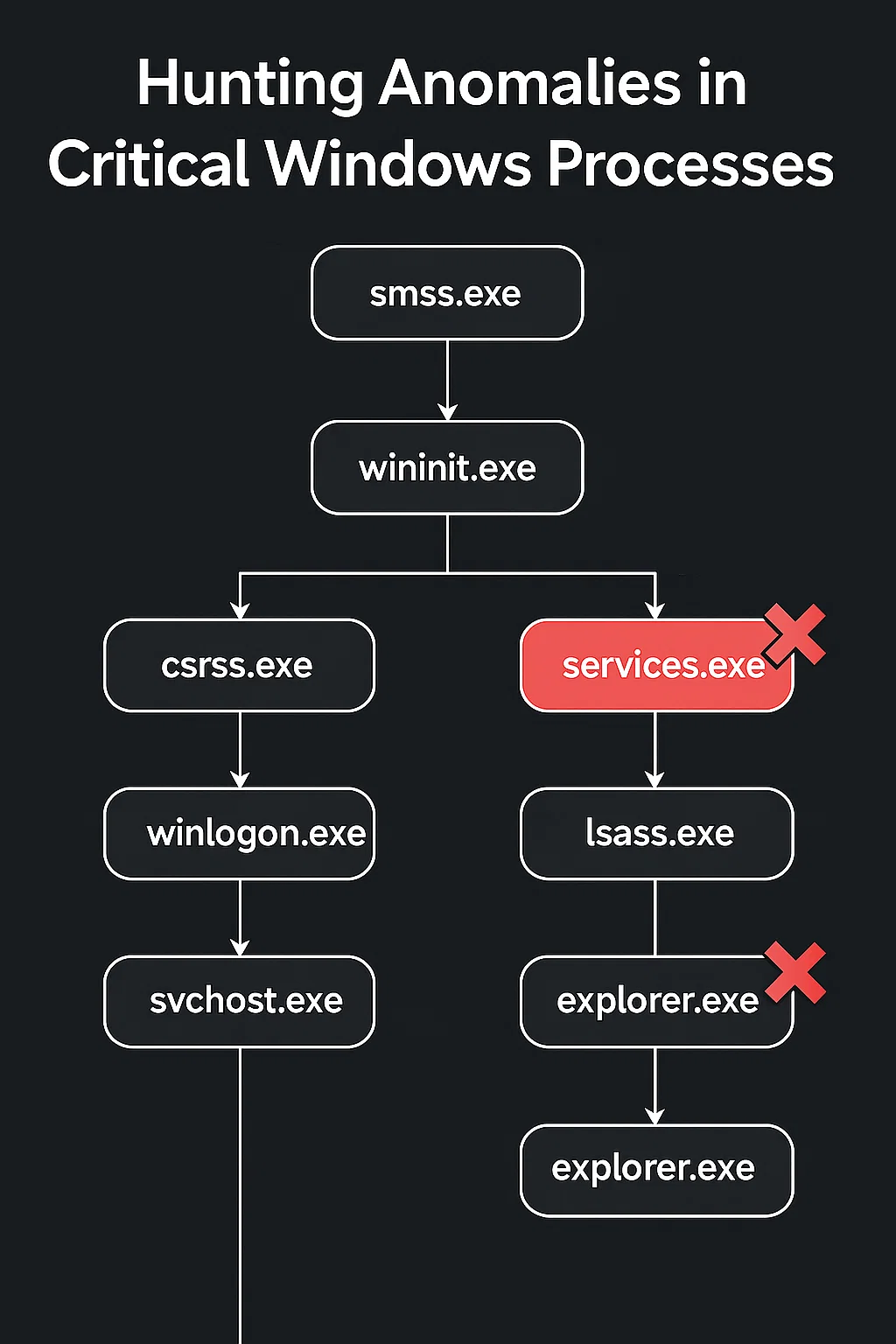
Windows isn’t just an operating system it’s a living hierarchy of interdependent processes. Each has a specific lineage, and when that lineage breaks, something’s wrong.
Let’s meet the core members of that family:
smss.exe – The Session Manager
The very first user-mode process created by the kernel. It launches csrss.exe and wininit.exe.
If smss.exe is altered, the entire system boot chain can collapse.
csrss.exe – The Client/Server Runtime
Spawned by smss.exe, it manages threads and console windows.
Attackers love to inject shellcode here to run early in the logon phase if csrss.exe’s parent doesn’t match expectations, it’s a serious red flag.
wininit.exe – The Windows Initializer
Created by smss.exe, it spins up key services like services.exe and lsass.exe.
If something other than smss.exe or wininit.exe touches these, assume tampering.
lsass.exe – The Security Engine
The heart of Windows authentication. It holds password hashes and access tokens. It must always be launched by wininit.exe from C:\Windows\System32\lsass.exe. Anything else likely means credential theft activity think Mimikatz or similar tooling.
services.exe – The Service Control Manager
This one orchestrates every Windows service.
If it runs from %TEMP% or another non-system directory, you’re looking at a rogue copy a hallmark of lateral movement or privilege escalation.
winlogon.exe & userinit.exe – The Logon Gatekeepers
These manage the user logon flow.
When winlogon.exe and userinit.exe behave strangely, it often means someone is inserting themselves into the authentication path.
explorer.exe – The Windows Shell
The user’s desktop, taskbar, and file explorer.
It’s also a favorite disguise. A malicious explorer.exe running from anywhere other than %SystemRoot% could be quietly running persistence code.
How the Plugin Detects Anomalies
ProcessAnomalyCheck crawls through a memory image and verifies that critical Windows processes are both:
Spawned by the correct parent
lsass.exeexpected parent:wininit.exesvchost.exeexpected parent:services.exeexplorer.exeexpected parent:userinit.exe
Executed from the correct path
The plugin extracts the command-line path from each process and compares it to expected directories like C:\Windows\System32\ or %SystemRoot%.
Any mismatch even a subtle one gets flagged as an anomaly.
It’s a lightweight but effective way to reveal process hollowing, path spoofing, and privilege-chain manipulation directly inside a memory dump.
Installing and Using the Plugin
Setup Steps
- Save the plugin as
processanomalycheck.py. - Place it in the Volatility 3 plugin directory:
- Cloned repo:
volatility3/plugins/windows/ - pip install:
site-packages/volatility3/plugins/windows/
- Cloned repo:
- Verify installation
python3 vol.py --info | grep processanomalycheck

Expected Volatility output:
windows.processanomalycheck Checks the parent process and execution path of critical Windows processes for anomalies.Use
python3 vol.py -f memory_dump.vmem windows.processanomalycheck
Why It Matters
Attackers don’t always create new processes; sometimes they bend the rules of existing ones.
A fake svchost.exe, a lsass.exe in the wrong folder, or an explorer.exe spawned by something unexpected these are the details that traditional tools often miss.
The ProcessAnomalyCheck plugin automates this integrity validation for analysts, bridging the gap between raw process listings and real-world behavioral insight.
In other words: it doesn’t just list what’s running it checks if it should be running that way.
Conclusion
Every Windows machine has a rhythm a predictable order of creation, inheritance, and execution.
When that rhythm skips a beat, something’s wrong.
The ProcessAnomalyCheck plugin gives forensic analysts a fast, reliable way to spot those breaks — turning process analysis from a manual slog into an intelligent integrity check.
Because in digital forensics, even the most trusted process deserves a background check.
Reference
.svg)








.svg)